4.1 Overview of Respondent Groups
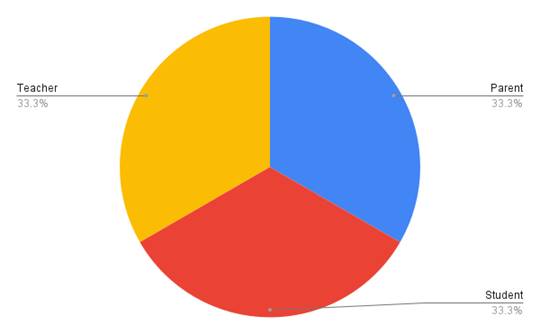
Three hundred people, in the end, sat for this study—split evenly into parents, students, and teachers, a hundred apiece—and their responses were kept separate by group throughout the analysis rather than pooled together, since the whole point was to see where these three vantage points agreed and where they quietly diverged (Figure 1). What follows works through each group in turn: who they were, what the numbers showed, and then the thematic patterns that emerged from their open-ended responses.
4.2 Parents
Who responded. The hundred parents surveyed described children who, by and large, start coding young—Figure 2 makes that fairly clear, with a noticeable cluster in the earlier school years. It's tempting to read this against a broader shift already underway: Bangladesh's recent curriculum reform, which removes board examinations before Class 10 (The Business Standard, 2021), may well push that starting age even earlier in coming years, though that's an inference rather than something this dataset can confirm outright. On the practical side, most households reported having the devices online classes require, and the smartphone, unsurprisingly, was the device of choice (Figures 3 and 4).
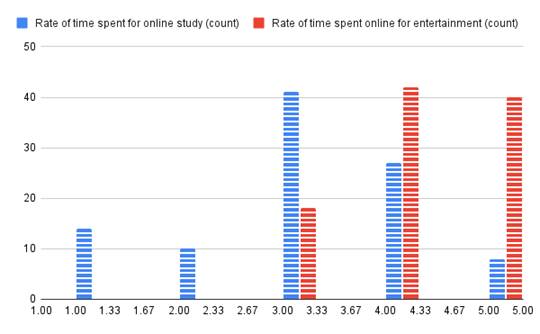
What the numbers showed. Asked to compare how much time their children spent online for studying versus everything else, parents' ratings told a fairly stark story (Figure 5): the line tracking study-related use starts low and stays low, while the line tracking off-task use begins at a moderate level and climbs sharply toward the high end. Put differently—and parents seemed to sense this themselves—the screen is doing double duty, and not always in the direction intended. That impression held up when we looked at what children actually do online: games dominate, YouTube trails a respectable second, and the gap between either of those and time spent on actual schoolwork is, frankly, substantial (Figure 6).
Why parents think this happens. When asked to name the source of distraction, 32% of parents pointed to material that's simply too hard to follow—a pattern that lines up with what Aagaard (2015) found when looking at off-task technology use more broadly (Figure 7). Close behind, at 25.7%, was a weaker sense of connection between child and teacher, echoing Kedia and Mishra's (2023) work on what shapes online learning effectiveness. Easy access to distracting content accounted for another 23.9%, while disengaging lessons and the child's age contributed smaller shares (7.2% and 11.3%, respectively). As for the parents' own struggles, two issues stood out above the rest (Figure 8): simply not knowing what their kids are doing during class, and not having the time, given work obligations, to guide them through it. A smaller but still notable group mentioned the difficulty of helping their child in person.
What might help, in their view. The improvement suggestions parents offered, summarized in Figure 9, leaned heavily toward oversight—restricting students from wandering off to new sites or leaving class without both parent and teacher knowing seemed to top the list, essentially asking for a monitoring layer that keeps activity within view. Tying lessons to real-world problems came next, followed by a preference for material that feels more like play than work. Remote monitoring capability, so parents could check in without being physically present, mattered to a meaningful share of respondents, as did the idea of quick in-class quizzes to surface confusion before it compounds. A smaller slice—about 6.9%—turned the lens on teachers themselves, suggesting their online activity be visible too; 10.1% wanted a dedicated forum for questions, and 10.5% admitted that juggling separate platforms for separate tasks was its own headache, favoring instead a single consolidated service.
4.3 Students
Who responded. A hundred students took part here, and Figure 10 shows just how wide a net that cast—class three, four, and six made up the bulk, but a fair number came from playgroup and nursery level too, reinforcing the early-start pattern parents had already hinted at.
Device and platform use. Nearly every student had access to whatever device online class required (Figure 11), though which device varied: smartphones led at 37.2%, desktops followed at 32.4%, laptops at 21.4%, tablets at a modest 6.9%, and a small remainder—2.1%—reported having no dedicated device at all (Figure 12). Zoom was, by a clear margin, the platform students used most, with Google Classroom and YouTube close behind; Facebook Live, Webex, and Microsoft Teams rounded out the list (Figure 13).
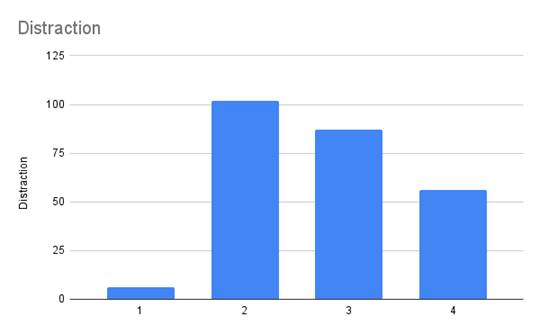
How focused students felt. Asked to rate their own focus fluctuation on a 0–5 scale, most students settled around 2 (Figure 17)—not catastrophic, but not exactly reassuring either, and a sizable cluster reported ratings of 3 and 4, suggesting that for a meaningful portion of this group, distraction wasn't an occasional lapse but a fairly regular companion during class.

Figure 1. Distribution of study participants by stakeholder group. Composition of the total sample (N = 300), divided equally among parents (n = 100), students (n = 100), and teachers (n = 100) of online coding classes.

Figure 2. Grade level at which children began learning programming, as reported by parents (n = 100). Histogram showing the academic class or grade level at which surveyed parents' children first started online coding instruction, indicating a concentration in early grade levels.

Figure 3. Electronic devices available for online classes, as reported by parents (n = 100). Proportion of households reporting access to each device type (e.g., smartphone, desktop, laptop, tablet) for their child's online coding sessions.

Figure 4. Electronic devices most frequently used for online classes, as reported by parents (n = 100). Distribution of primary device usage among children during online coding instruction, with smartphones representing the most commonly used device.

Figure 5. Parent-rated time spent online by children for study versus entertainment purposes (n = 100). Line plot comparing self-reported rates of study-related online time (blue dashed line) and off-task, entertainment-related online time (red dashed line) on a 1 (very low) to 5 (very high) scale.

Figure 6. Distribution of children's online activities, as reported by parents (n = 100). Proportion of time children spend on different online activities (e.g., gaming, YouTube, study materials) during non-instructional periods, as estimated by parents.

Figure 7. Parent-reported causes of student distraction during online coding classes (n = 100). Percentage breakdown of distraction sources identified by parents, including material difficulty, weak instructor connection, easy access to distracting content, lack of engagement, and child age.

Figure 8. Difficulties reported by parents in supporting their child's online learning (n = 100). Frequency distribution of parent-reported challenges, including limited visibility into children's online activity, time constraints due to work obligations, and inability to provide in-person guidance.

Figure 9. Parent suggestions for improving the online learning experience (n = 100). Ranked distribution of improvement strategies proposed by parents, including activity-restriction and monitoring features, real-world lesson integration, gamified materials, remote class oversight, on-the-spot quizzes, teacher activity visibility, dedicated Q&A forums, and consolidated software platforms.

Figure 10. Distribution of student participants by grade level (n = 100). Histogram showing the academic class or grade level distribution of surveyed students, with the largest proportions concentrated in Classes 3, 4, and 6.
Where the time actually goes. Self-reported online activity put gaming at the top, claiming 27% of students' time, with YouTube a close second at 26% (Figure 14). Study-related use came in at 23%—lower than either entertainment category—while social media took roughly 16% and TikTok another 8%. So, even by students' own account, the balance tips away from the classroom more often than toward it.
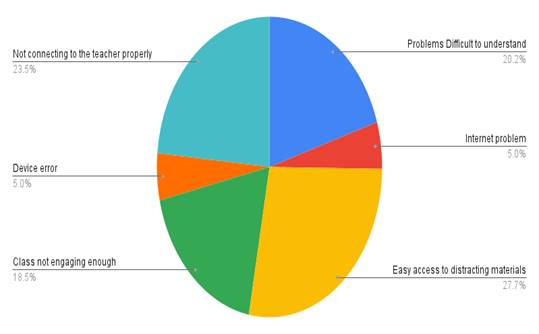
What pulls focus away. When asked directly what causes them to lose concentration, 27.7% named easily accessible distractions like games and social media as the main culprit (Figure 15). A close second, at 23.5%, was difficulty connecting with the teacher, and 20.2% cited the material itself being too hard to follow. Lessons simply not being engaging enough accounted for 18.5%, while internet and device issues each contributed a smaller 5%.
What students would change. Improvement suggestions, gathered in Figure 16, spread across several priorities rather than collapsing into one dominant answer. Connecting lessons to real-world relevance and making them more engaging each drew 15% support; on-the-spot quizzes for immediate feedback drew 13%; and limiting browsing without teacher awareness—essentially a request for boundaries—drew 12%. Centralized, all-in-one services appealed to 8%, while class recording and dedicated Q&A forums each gathered 7%. Smaller shares favored parent notifications, restricting teacher browsing, and unified software (6% each), with remote parental monitoring, teacher-side tab tracking, and improved internet infrastructure trailing at 3%, 2%, and 2%, respectively.
4.4 Teachers
Who responded. A hundred teachers, drawn from various parts of the country, completed this portion of the study. Figure 18 displays the spread of classes they teach, and notably, 95% reported teaching online while a smaller 15% also continued some offline instruction—a reminder that for many, this wasn't an either-or shift but a layered one. Smartphones again led device usage at 41%, with desktops at 31% and laptops at 28% (Figure 19).
Challenges, online versus offline. When teachers rated the number of challenges they faced in each format, the pattern leaned toward online classes carrying the heavier load (Figure 20)—not an overwhelming difference, but a consistent one across respondents.
Platforms and systems in practice. Zoom again topped the list, commanding 33% of teacher confidence, with Google Classroom and Google Meet combined drawing 30% and YouTube taking 14% (Figure 21). Facebook Live held 12%, and Cisco Webex another 11%. For distributing materials, recorded sessions and Google Drive links ranked highest, followed by screenshots and, somewhat further behind, email; a subset of teachers also relied on a formal Learning Management System (Figure 22). Examinations followed a similar pattern—handwritten tests and Google Forms were used in roughly comparable measure, with LMS-based testing appearing as a secondary option (Figure 23).
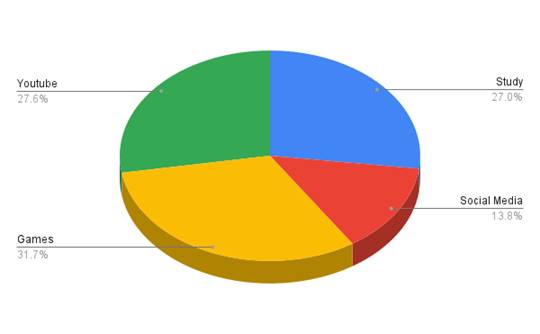
What teachers observe in their students. Teachers' perception of student time allocation, shown in Figure 24, largely mirrored what students reported about themselves: 31.7% of time on games, 27.6% on YouTube, and studying trailing in third at 27%, with social media absorbing another 13.8%. The fact that teacher perception and student self-report converge this closely is, if nothing else, a small piece of corroborating evidence that the pattern is real rather than an artifact of how one group happened to answer.
What teachers would change. The single most favored suggestion among teachers was consolidation—"one service for all necessary tasks," as several put it—which, when paired with their interest in monitoring student activity during class, suggests teachers see oversight and simplicity as two sides of the same fix (Figure 25). Beyond that, real-world problem framing and game-like lesson design came up often. Figure 26 breaks this down further: among the hundred teachers surveyed, an all-in-one service drew the most mentions (12), ahead of storing class videos, enabling shared viewing, and remote parental monitoring, each cited 8 times. Taken together, this points fairly clearly toward a preference for one consolidated platform over a patchwork of disconnected tools.
How existing platforms compare. To ground these preferences against what's actually available, Table 1 lays out a comparison of commonly used conferencing systems, built on data reported by TechRepublic (2020). Most share a baseline feature set—screen sharing, interactive tools, mobile compatibility—but the differences are where it gets interesting: Zoom offers remote control and annotation, Google Meet folds neatly into the broader Google Classroom ecosystem, Webex distinguishes itself

Figure 11. Device availability for online classes, as reported by students (n = 100). Proportion of students reporting access to at least one electronic device suitable for participation in online coding classes.

Figure 12. Primary device type used for online classes, as reported by students (n = 100). Percentage distribution of device usage by type: smartphone (37.2%), desktop computer (32.4%), laptop (21.4%), tablet (6.9%), and no dedicated device (2.1%).

Figure 13. Online learning platforms used by students (n = 100). Distribution of platform usage for online coding instruction, including Zoom, Google Classroom, YouTube, Facebook Live, Cisco Webex, and Microsoft Teams.

Figure 14. Distribution of students' self-reported online activity time (n = 100). Percentage of time allocated to computer games (27%), YouTube (26%), study materials (23%), social media (16%), and TikTok (8%) during online sessions.

Figure 15. Student-reported causes of distraction during online classes (n = 100). Percentage breakdown of distraction sources identified by students, including accessible distracting content (27.7%), weak instructor connection (23.5%), material difficulty (20.2%), low lesson engagement (18.5%), internet issues (5%), and device issues (5%).

Figure 16. Student suggestions for improving the online learning experience (n = 100). Ranked distribution of improvement priorities identified by students, including real-world relevance, lesson engagement, on-the-spot quizzes, browsing restrictions, centralized services, class recording, Q&A forums, parent notifications, and infrastructure improvements.

Figure 17. Student self-rated focus fluctuation during online classes (n = 100). Distribution of focus ratings on a 0 (lowest) to 5 (highest) scale, with the modal response at 2 and a substantial subset of students reporting ratings of 3–4, indicating frequent attentional lapses.

Figure 18. Distribution of class levels taught by surveyed teachers (n = 100). Histogram showing the range of grade levels taught by participating teachers in online coding instruction.

Figure 19. Distribution of teachers' class delivery methods (n = 100). Proportion of teachers delivering instruction online only, offline only, or through a combination of both formats; 95% reported teaching online and 15% reported also teaching offline.

Figure 20. Distribution of devices used by teachers for online instruction (n = 100). Percentage of teachers using smartphones (41%), desktop computers (31%), and laptops (28%) to conduct online coding classes.

Figure 21. Teacher-reported number of challenges faced during online versus offline classes (n = 100). Comparative distribution of self-rated challenge counts across both instructional formats, with online classes associated with a higher overall challenge burden.

Figure 22. Distribution of online platforms used by teachers for class delivery (n = 100). Percentage breakdown of platform usage, including Zoom (33%), Google Classroom/Google Meet (30%), YouTube (14%), Facebook Live (12%), and Cisco Webex (11%).

Figure 23. Systems used by teachers for providing instructional materials (n = 100). Distribution of material-delivery methods, including recorded sessions, Google Drive links, screenshots, email, and institutional Learning Management Systems (LMS).

Figure 24. Systems used by teachers for conducting examinations (n = 100). Distribution of assessment methods, including handwritten examinations, Google Forms, and LMS-based testing.

Figure 25. Teacher-reported distribution of students' online activities (n = 100). Estimated percentage of student time spent on online games (31.7%), YouTube (27.6%), study materials (27%), and social media (13.8%), as perceived by teachers.

Figure 26. Teacher suggestions for improving the online learning experience (n = 100). Frequency of improvement strategies proposed by teachers, with an all-in-one consolidated service receiving the most mentions (n = 12), followed by class video storage, shared viewing capability, and remote parental monitoring (n = 8 each).
Table 1: Comparison of Commonly Used Online Conferencing Platforms for Coding Instruction. Feature comparison across four widely used conferencing platforms (Zoom, Microsoft Teams, Google Meet, Cisco Webex) relevant to online coding instruction, including cost structure, screen-sharing capability, interactive functionality, encryption status, and mobile accessibility. Y = feature available; L = limited availability; O = optional/configurable; N = feature not available. Data adapted from a platform comparison reported by TechRepublic (2020). Note. Y = Yes, L = Limited, O = Optional, N = No. Data from TechRepublic (2020).
|
|
Free
|
Screen-sharing
|
Interaction
|
Encryption
|
Mobile
|
|
Zoom
|
Y
|
Y
|
Y
|
N
|
Y
|
|
Teams
|
L
|
Y
|
Y
|
N
|
Y
|
|
Meet
|
Y
|
Y
|
Y
|
N
|
Y
|
|
Webex
|
Y
|
Y
|
Y
|
O
|
Y
|
through end-to-end encryption, and Microsoft Teams tends to support larger participant counts than the others. No single platform, in other words, checks every box teachers said they wanted.
Taken as a whole, these findings—drawn from three groups, two data-collection methods, and a fair amount of cross-checking between them—converge on a fairly consistent picture: distraction in online coding classes isn't really one problem wearing different masks for different people, but a smaller cluster of related issues (disconnection, dense material, and easy escape routes) showing up, again and again, from whichever angle you look at it.